Planning Using Primavera: Suretrak Project Manager Version 3.0
Chapter 10: Filters and Layouts

This chapter covers the ability of SureTrak to control the presentation of information, both on the screen and in printouts by using Filters and Layouts.

10.1 Understanding Filters

SureTrak has an ability to display only tasks that meet specific criteria. You may wish to only see the Project Manager s work or perhaps Saturday work or even the work over the next couple of months. SureTrak defaults to displaying all activities and has a number of filters already available that you might like to use or edit. You can also create one or more of your own.

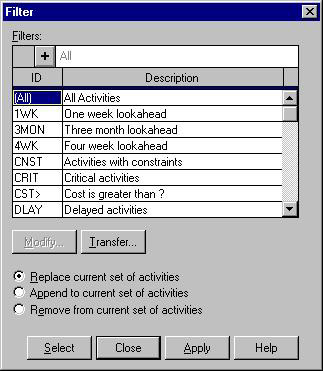
Select Format, Filter or click the icon on the toolbar to display the Filter form:

  • Modify displays the filter specification for editing the filter criteria.

  • Transfer is a facility for copying filters from other project files.

  • Replace only displays activities that meet the filter criteria.

  • Append to adds activities to the display that meet the filter criteria.

  • Remove from removes from the display activities that meet the filter criteria.

  • Select highlights activities that meet the filter s criteria.

  • Apply applies the selected filter and displays only activities that meet the criteria.

  • A filter may also be applied by selecting one from the drop-down box in the Layout toolbar.

10.2 Creating and Modifying Filters

We will take you through the process of creating a new filter to display activities that are incomplete.

  • Press the icon or click into a blank...

UNLIMITED FREE
ACCESS
TO THE WORLD'S BEST IDEAS

SUBMIT
Already a GlobalSpec user? Log in.

This is embarrasing...

An error occurred while processing the form. Please try again in a few minutes.

Customize Your GlobalSpec Experience

Category: Crystal Filters
Finish!
Privacy Policy

This is embarrasing...

An error occurred while processing the form. Please try again in a few minutes.