Planning Using Primavera: Suretrak Project Manager Version 3.0

Chapter 20: Project Utilities

Overview

Under Tools, Project Utilities the following options are available:

  • Back Up

  • Restore

  • Delete

  • Check-in/Check-out

20.1 Backup and Restore

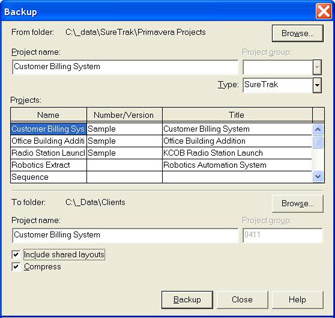
The Backup and Restore function may be used to compresses all the SureTrak files and Layouts, if required, into a single STX or PRX file. A STX is created for a backed up SureTrak type file and PRX for a Project Group or Concentric (P3) project. This is a good method for emailing projects as there is a single compressed file created and for keeping project files for long term.

This function may also be used for backing up to floppy disks and restoring fromfloppy disks and if more than one disk is required then the software will prompt for additional disks.

The Backup function will backup Layouts from and Restore will restore layouts to the Layout file Location set in the Options form. It is therefore important to ensure the Layout directory Location is set before using Backup or Restore.

20.1.1 Backup

The Backup function has the option to backup layouts or not to backup layouts, but the directory set in the Options form is the directory used for backing up and restoring layouts. There is an option for compressing files, it is recommended this is always checked as a single PRX or STX file is created.

20.1.2 Restore

The Restore command has a similar option for restoring Layouts and you may decide to ...

UNLIMITED FREE
ACCESS
TO THE WORLD'S BEST IDEAS

SUBMIT
Already a GlobalSpec user? Log in.

This is embarrasing...

An error occurred while processing the form. Please try again in a few minutes.

Customize Your GlobalSpec Experience

Category: Backup and Recovery Software
Finish!
Privacy Policy

This is embarrasing...

An error occurred while processing the form. Please try again in a few minutes.