Planning Using Primavera: Suretrak Project Manager Version 3.0
The Options forms allow you to decide how SureTrak calculates and displays information. Most of the options are self-explanatory. Under Tools, Options, there are six tabs:
Project
Resource
General
Defaults
View
File Locations
This chapter will explain the functions of each function form.
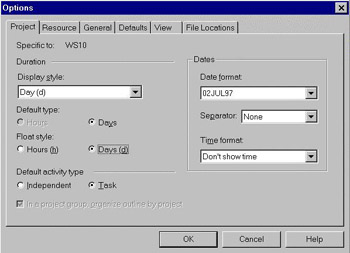
This information was covered in the chapter CREATING A PROJECT AND SETTING UP THE SOFTWARE. To recap:

Display Style is the format used in the bar chart columns. Select Days unless more detailed planning is required.
Default Type specifies the format in which durations may be entered and how they are displayed on the screen. If Days is selected as the default, then a duration entered as 2 will give a 2 day duration activity. A 2 hour duration activity should be entered as 2h.
Float Style is the display format for float.
This should be set as Task unless advanced resourcing calculations are required.
| Tip | To avoid the confusion between the numerical US date style, (mmddyy) and the numerical European date style, (ddmmyy) you should adopt the ddmmmyy style as displayed above, 02JUL97. For example in the USA 020797 is read as 07 Feb 97 and in most other countries as 02 Jul 97. |
These options affect how the software calculates percentages, Remaining Durations and costs...