9.4 Scheduling the Project
Now that you have activities and logic in place, it is time to calculate the activity dates. More specifically, you will Schedule the project to calculate the Early Dates, Late Dates and the Total Float. This will allow you to determine the Critical Path of the project.
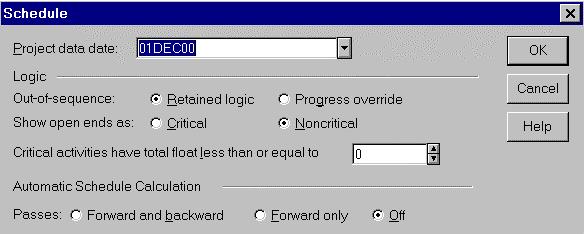
To schedule your project, select Tools, Schedule and check that the Project data date is correct.
If you know that your data date is correct, then you may simply press F9 or click on the  icon to schedule the project.
When Automatic Schedule calculation is turned off it is possible to edit the Early Dates in the Activity form when the correct option is selected in Tools, Options, Defaults tab. These are then reset when the schedule is recalculated.
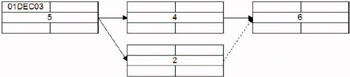
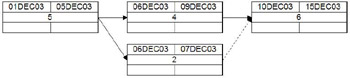
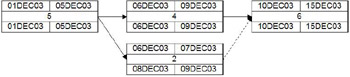
To help understand the calculation of late and early dates, float and critical path, we will now manually work through an example. The boxes below represent activities.
The forward pass calculates the early dates: EF = ES + DUR 1
Start the calculation from the first activity and work forward in time assuming a 7-day working week.
The backward pass calculates the late dates: LS = LF DUR + 1
Start the calculation at the last activity and work backwards in time.
| Note | The Critical Path is the path where any delay causes a delay in the project. |


 TABLE OF CONTENTS