Planning Using Primavera: Suretrak Project Manager Version 3.0
Statusing a project with resources takes place in two distinct steps:
The dates are statused using the methods outlined in the TRACKING PROGRESS chapter, then
The resources are updated.
This chapter covers the following topics:
Understanding Target Schedule and Budgets
Understanding the Data Date with respect to resources
Information Required to Update a Resourced Schedule
Further techniques for Updating Dates and Percentage Complete
Updating Resources
Resource Histogram, S-Curves and Tables
The Budget hours or quantities and costs of resources are automatically recorded in the Budget field of each resource as it is assigned to an activity.
| Tip | The Budget Costs and Quantities are always set equal to the To Complete until the activity has Started. This may be frustrating should you wish to show a revised estimate that is different from the Budget for unstarted activities. |
A Target Schedule records the planned start and finish dates. The Target Dates are a copy of the current schedule dates that are copied into two fields:
Target Start and
Target Finish
Setting the Target dates was covered in the chapter TRACKING PROGRESS.
Target dates may be displayed using the following methods:
Display the Target Start and Finish columns
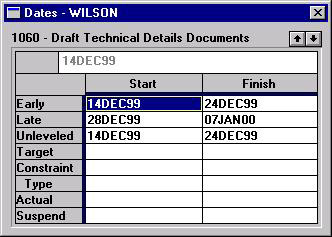
Display the Activity Detail, Dates form (shown below)
Display the Bar Chart Bars

The Data Date is also known as Review Date, Status Date, As Of Date and Update...