Planning Using Primavera: Suretrak Project Manager Version 3.0

Chapter 12: Tracking Progress

Overview

You have completed the plan or have completed sufficient iterations to have an acceptable plan, and the project is progressing. Now the important phase of regular monitoring begins. Monitoring is important to help catch problems as early as possible, and thus to help minimize the impact of the problem on the successful completion of the project.

The main steps for monitoring progress are:

  • Setting the Target dates these are the dates against which progress is compared

  • Record or mark-up progress

  • Update or status the schedule

  • Compare and report actual progress against planned progress and revise the schedule if required.

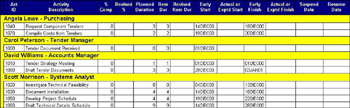
Often a statusing report, such as the one below, is printed out with page breaks at each responsible person. This report is distributed for them to mark up the projects progress and returned it to the scheduler. It has a filter applied that displays the activities that are incomplete and those that will start in the next few weeks.

12.1 Setting the Target

Setting the Target copies the planned start and planned finish dates into fields titled Target Start and Target Finish. Once you have set the Target dates you will be able to compare your progress with your original plan. You will be able to see if you are ahead or behind schedule and by how much. If you do not set the Target dates you will be unable to compare your progress with your original...

UNLIMITED FREE
ACCESS
TO THE WORLD'S BEST IDEAS

SUBMIT
Already a GlobalSpec user? Log in.

This is embarrasing...

An error occurred while processing the form. Please try again in a few minutes.

Customize Your GlobalSpec Experience

Category: Project Management Services
Finish!
Privacy Policy

This is embarrasing...

An error occurred while processing the form. Please try again in a few minutes.