Planning Using Primavera: Suretrak Project Manager Version 3.0
You are now at the stage to print the schedule so other people may review and comment on it. This chapter will examine of the many of the options for printing your project.
Print settings apply to all Layouts and are not saved as part of a layout.
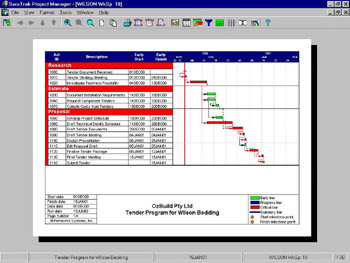
Select File, Print Preview or use the
icon on the toolbar to view the printout in the print preview view

From left to right the following describes the functions of the icons at the top of the screen:
The icon on the left returns you to the normal view
The arrows allow scrolling when a printout has more than one page
The magnifying glass zooms in and zooms out
The next two icons display one or all pages
The next four are for Printing, Page set-up, Header and Footer set-up
The next group accesses the Layout and Formatting settings
The last is Help.
Click the
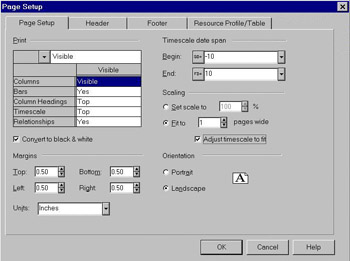
icon on the toolbar or select File, Page Setup to display the Page Setup form.

The Page Setup form contains the following tabs:
Page Setup
Header
Footer
Resource Profile/Table
In the Page Setup tab:

Click on the top left hand box below print to select to print All, Visible or None of the columns that are displayed in the normal view.
The drop-down boxes next to Columns, Bars, Column...