Rendering with MicroStation
Through illustrations and hands-on exercises, this book covers every aspect of rendering in detail, including cameras, materials, lighting, environment maps, and rendering settings.
 TABLE OF CONTENTS
 Rendering is controlled by a number of settings, some of which you have already seen and worked with. The various settings that affect the rendering process are located in the Rendering Settings dialog box (Settings > Rendering > General).
Settings in this group control the accuracy and appearance of the rendered images.
Stroke Tolerance is a very important setting as it affects both rendering time and image quality, where curved surfaces are involved. All rendering and hidden line routines are affected by this setting.
When a 3D design is rendered, it is divided into polygons (in memory), with curved surfaces being represented by a polygon mesh. Stroke tolerance determines the size of these polygons, which directly affects the accuracy of curved surfaces displayed in the shaded image. This is most apparent at the edges of curved objects.
Stroke tolerance is the maximum distance (in pixels) that a surface can deviate from the polygons used to render it. Stroke Tolerance can be from 0.001 through 1000.00, with smaller settings providing more accurate representations of curved surfaces, but at the cost of longer rendering times. For most rendering, the default of 0.500 provides excellent results. For some images, however, you may need to use a smaller setting.
Open DGN file divetime.dgn.
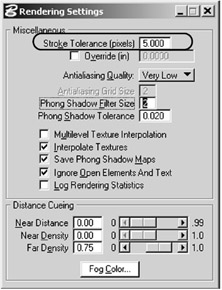
Select Settings > Rendering > General.
The Rendering Settings dialog box appears.
Change the Stroke Tolerance setting to 5.0.
Select Render with the...