Rendering with MicroStation
Through illustrations and hands-on exercises, this book covers every aspect of rendering in detail, including cameras, materials, lighting, environment maps, and rendering settings.
 TABLE OF CONTENTS
 MicroStation can render and display stereo anaglyph images, although 3D glasses are required to properly see the final result in stereo. The only major drawback to this type of stereo viewing is that the image colors are altered by the red and blue lenses needed to visualize the 3D stereo effect. The advantages to this type of stereo viewing is that you can visualize the results on a monitor, projection screen, or a print using inexpensive glasses.
The next exercise requires a pair of anaglyph red/blue 3D glasses to view the rendered image in stereo.
Continuing in diamond ring.dgn, in the Ray Tracing dialog box, turn off Visible Environment.
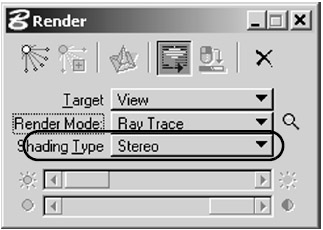
In the Render dialog box, change the Shading Type to Stereo.
 Use the Render tool to ray trace View 4 with the current solution.
The view will render twice before the final image is combined and displayed. You will need a pair of anaglyph 3D glasses to properly view the resulting image.
| Note | All render modes and hidden line routines will display as stereo when the Shading Type is set to Stereo, except for Wiremesh. |








