Rendering with MicroStation

Through illustrations and hands-on exercises, this book covers every aspect of rendering in detail, including cameras, materials, lighting, environment maps, and rendering settings.
 TABLE OF CONTENTS
 MicroStation 's Facet Smoothing tool is used to improve the rendered quality of discrete polygons. It is used to apply smoothing to any polygonal model. In this chapter, you will learn to use the Facet Smoothing tool to smooth models constructed from individual polygons.
This chapter continues the subject of applying materials to elements in a model, but with the focus on digital terrain models (DTM). It covers items that are essential for working with DTMs: Facet Smoothing and Elevation Draping.
Prior to a discussion on facet smoothing, one needs to know a little bit about "surface normals" since they play an important role in the use of the Facet Smoothing tool. A surface normal is a vector perpendicular to a surface pointing outward. A solid or 3D primitive such as a cone, slab, or sphere will have surface normals as well. With a solid, the surface normals will always face away from the solid. Every time you place a polygon in MicroStation, it will have a surface normal. For performance reasons, most virtual reality software packages will only render the sides of those polygons that have the normal pointing toward the viewer. MicroStation always renders both sides of surfaces; however, you can toggle this feature off when using radiosity or particle tracing.
When a surface is mirrored in MicroStation, the surface normals are flipped, as seen in the following image.
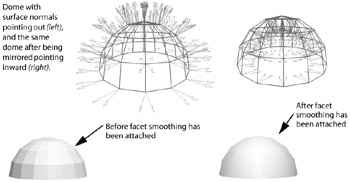
Since all the normals for the dome are reversed, the facet smoothing will still work fine. What...