Rendering with MicroStation
Through illustrations and hands-on exercises, this book covers every aspect of rendering in detail, including cameras, materials, lighting, environment maps, and rendering settings.
 TABLE OF CONTENTS
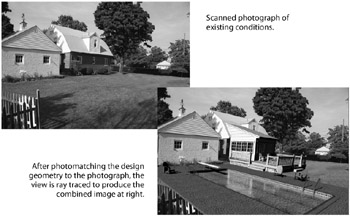
 Photomatching is the process of adjusting the view camera to match the perspective of a photograph, or rendered image. This is done by matching points in the photograph to the equivalent points in your 3D design. Using photomatching, you can create a rendered image of your design overlaying existing conditions (in the photograph).
MicroStation's Photomatch tool lets you quickly and precisely match geometry in a 3D model to an existing photograph.
To get the best results on the first try, you need to set up a camera view that closely matches that of the photograph. This camera view does not need to be matched perfectly, but should be somewhat close. This will make it easier to choose and match points in the 3D model to those in the photograph. By matching known points in the design to equivalent points in the photograph, the system refines the camera view to accurately match the perspective of the photograph.
Once this step has been completed, the view can be rendered to display the design geometry merged with the existing conditions.
Open phmatch.dgn.
The file has been saved with Top and Front views displaying elements representing the existing buildings. These elements, on level existing house, will be used to align a camera view to a photograph. Once matched, the existing house level will be turned off, and the levels containing the...