Rendering with MicroStation
Through illustrations and hands-on exercises, this book covers every aspect of rendering in detail, including cameras, materials, lighting, environment maps, and rendering settings.
 TABLE OF CONTENTS
 You have worked with settings from the Ray Tracing dialog box in previous exercises. The following describes all the settings located in this dialog box.
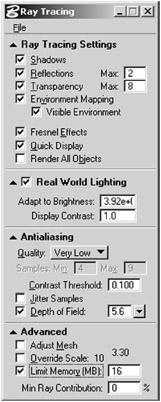
The Ray Tracing dialog box is used to adjust all Ray Tracing settings. To open the Ray Tracing dialog box, select Settings > Rendering > Ray Tracing, or, with Ray Trace as the render mode, click the Open Ray Tracing settings dialog icon in the Render dialog box.
DIALOG RAYTRACE
This contains general ray tracing settings.
If on, shadows are rendered for each light that has shadows enabled. If off, no shadows are rendered for any lights.
RAYTRACE SHADOWS
RAYTRACE SET SHADOWS ON
RAYTRACE SET SHADOWS OFF
If on, reflections are rendered for any elements that have their Reflect material attribute set to a value greater than 0. If off, no reflections are rendered for any elements.
RAYTRACE REFLECTIONS
RAYTRACE SET REFLECTIONS ON
RAYTRACE SET REFLECTIONS OFF
The Max field to the right of the Reflections field sets how many reflections can be generated per ray if Reflections is on. This can be any integer from 0 to 999.
RAYTRACE SET MAXREFLECTIONS
If on, transparency is rendered in a view that has its Transparency attribute on (Settings > Rendering > View Attributes) and transmitted rays are computed for any elements whose Transparency material setting is greater than 0.
If off, transparency is not rendered for any element. This also applies to elements that...