Rendering with MicroStation
Through illustrations and hands-on exercises, this book covers every aspect of rendering in detail, including cameras, materials, lighting, environment maps, and rendering settings.
 TABLE OF CONTENTS
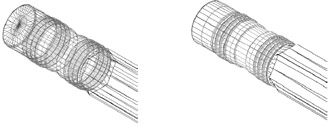
 To begin, you will look at the wireframe routines. Wireframes have been in existence for many years and are still useful today for reviewing 3D models. The first of these, Wiremesh, is similar to wireframe display. All elements are transparent and do not obscure other elements. Hidden lines are not removed. Wiremesh differs from Wireframe display in that curved surfaces are represented by a polygonal mesh. This can increase the realism of curved surfaces, although it may also increase the amount of clutter as more lines are displayed for surfaces that normally would be hidden. Both Hidden Line and Filled Hidden Line display only those surfaces that would be visible in real life.
Open model Default in no2_pencil.dgn.
The design file has six views defined to allow easy comparison among the different rendering modes.
In the Rendering Tools tool box, select the Render tool with the following settings:
Target: View
Render Mode: Wiremesh
Enter a data point in View 3.
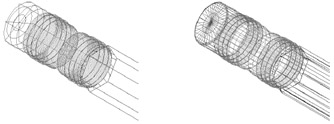
Wireframe (left) and Wiremesh (right).
Note the difference in appearance between the default Wireframe display in View 2 and the Wiremesh display in View 3. Wiremesh is similar to Wireframe but with more lines and/or triangles to better display surfaces.
In the Render tool settings, set:
Render Mode: Hidden Line.
Enter a data point in View 4.
View 4 updates with hidden lines removed.
Wiremesh...