Rendering with MicroStation
Through illustrations and hands-on exercises, this book covers every aspect of rendering in detail, including cameras, materials, lighting, environment maps, and rendering settings.
 TABLE OF CONTENTS
 Several settings in the View Attributes dialog box affect the display of rendered images. For example, you can use View Attribute settings to affect whether and how certain types and classes of elements display. Changes take effect when you click Apply (for the view shown inView Number) or All (to apply to all views).
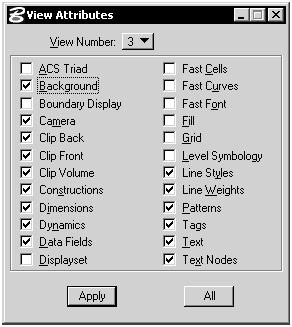
The view attributes that affect the rendering process are as follows.
If checked and a background image is defined, the background image will be displayed. If unchecked, a background image will not be displayed even if defined.
If checked, the view will have camera perspective. If unchecked, the view will be orthogonal.
If checked, these features are applied to the view. If unchecked, these view options are disabled.
This setting is particularly important to rendering. As a rule, constructions should be turned off in rendered views. MicroStation lights, for example, are made of construction elements and can cast unwanted shadows.
This determines whether or not elements in a displayset are displayed in a view. If a displayset is present and this attribute is enabled, only those elements in the current displayset are visible.