Practical Process Control for Engineers and Technicians
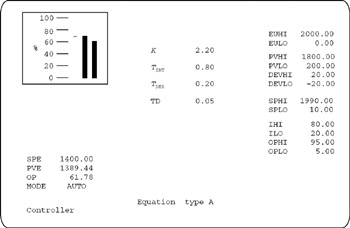
Each detail display is designed as operator interface for one controller or one major control unit. It displays and permits operation on variables, parameters and limits. The detail displays in the training applications use a similar layout and representation of information as with many industrial operator workstations (Figure C.1).
The detail display is divided vertically into three parts, a left, middle and right section. The section on the left hand side is for major control variables and bar-graphs. The section in the middle is for tuning constants. The section on the right hand side is for range, limit, alarm and status parameters.
An explanation of the abbreviations (or acronyms) used in the manual and on the displays are explained in the sections below.
| SPE | The setpoint in engineering units or the target value for the controller. The objective is to control and keep the value of PVE at the value of SPE. 0% of range of the SPE is defined by EULO and 100% of range of SPE is defined by EUHI. A green marker, on the left side of bar-graphs represents the SPE in % of range. |
| PVE | Process variable in engineering units. The controller is to control and keep the PVE at the value of SPE. 0% of range of PVE is defined by EULO and 100% of range of PVE is defined by EUHI. A cyan bar-graph represents the PVE in %... |