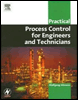
Practical Process Control for Engineers and Technicians
Exercise 1: Flow Control Loop Basic Example

E.1.1 Objective

This exercise will familiarize the student with the basic concept of closed loop control. It provides an opportunity to get a first feel for closed loop control. A flow control loop will serve as a practical example for this exercise. A flow control loop is generally not critical to operate and illustrates the basic principles effectively.

E.1.2 Operation

Since this is a relatively simple exercise, it can be used for familiarization with the principal operation of the simulation software. Call up the training application single flow loop as explained above.

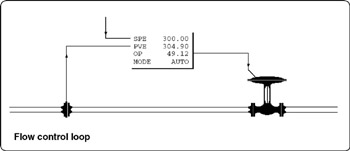
Now, press the F2 button to call up the flow control block diagram display. The display as shown in Figure Ex. 1.1 will appear. This display gives a general idea of the process and displays all major variables.


Ex. 1.1: Flow control display

First, we will observe the general behavior of the process. This is best done on a trend display. Call up the trend display of this exercise by pressing F4. At this stage the flow control is up and running correctly in automatic control. In order to observe the process reaction, as a result of changes in the position of the control valve, change the control mode from AUTO to MANUAL. Then, change the OP value of the controller to 20% as follows: Type the parameter name OP followed by Enter. Then enter the value 15 representing 15% of output.

E.1.3 Observation

We observe the process variable PVE (process variable in engineering units) as it...

UNLIMITED FREE
ACCESS
TO THE WORLD'S BEST IDEAS

SUBMIT
Already a GlobalSpec user? Log in.

This is embarrasing...

An error occurred while processing the form. Please try again in a few minutes.

Customize Your GlobalSpec Experience

Category: Flow Computers, Totalizers, and Indicators
Finish!
Privacy Policy

This is embarrasing...

An error occurred while processing the form. Please try again in a few minutes.