Dynamic Scheduling With Microsoft Office Project 2003: The Book by and for Professionals


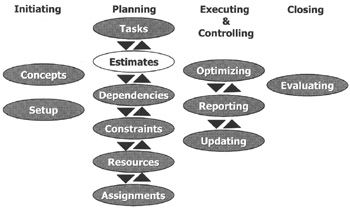
We have the Work Breakdown Structure including the activities ( Tasks) entered into our project schedule. The next step as highlighted in the illustration above is to enter the estimates.
After reading this chapter you will:
know a process for generating estimates
know what duration and work/effort estimates are
be able to enter duration and work estimates into MS Project
understand how MS Project uses the formula D * U = W when assignments are made or changed
be aware of the human tendencies in estimating
be aware of techniques to handle these human tendencies
be aware of practical difficulties in estimating
know techniques to address those practical difficulties
understand and be able to apply the rolling wave approach
understand the difference between pure and gross work time estimates
be able to check the estimates of the project schedule using scheduling best practices
know how to enter, move and copy data efficiently

Nob is bouncing his views on estimating off Bob: "You know the thing I have noticed is that my team members always pad their estimates. Just last week, Brian told me he was really busy and would perhaps not meet his deadline. Since then I have caught him going for a nice long lunch and I heard him chat up a storm at the water fountain. I can't even think of all the times that I saw him goof off in or around his work cubicle. I made it very clear to him that...