Dynamic Scheduling With Microsoft Office Project 2003: The Book by and for Professionals

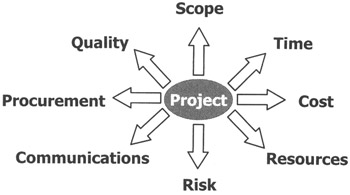
Optimizing a schedule is the true art of scheduling. When optimizing, you have to consider the project in all its aspects. The Project Management Institute has identified the dimensions by which projects need to be optimized in its Guide to the Project Management Body of Knowledge (PMBOK Guide). [1] These knowledge areas are shown with arrows in the illustration. A change in one area often impacts another. Eight forces are at work on each project, and project managers have to consider all of them in an integrated fashion. The PMBOK Guide calls this Project Integration Management, the ninth knowledge area. MS Project provides sufficient features to manage many, but not all, areas:

Quality
The quality of deliverables must correspond to the specifications and expectations of the client. You can schedule quality activities in MS Project, but the tool does not provide a full-fledged quality management system. Such a system typically contains the requirements, specifications or acceptance criteria for the deliverables. For software development projects, we recommend you complement MS Project with a requirements tracking system. However, quality impacts can and should always be considered while optimizing, even without a quality tracking system.
Scope
The scope of a project can be captured using the Work Breakdown Structure. It contains the deliverables to be produced and the activities can be derived from them. MS Project is an excellent tool for managing scope. Scope should always be considered when optimizing schedules. The...