Dynamic Scheduling With Microsoft Office Project 2003: The Book by and for Professionals

Optimizing for Time and Cost

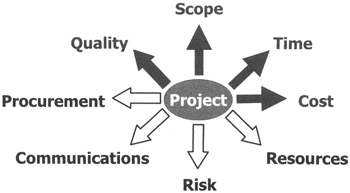
When you optimize for time and cost, you should consider the dimensions scope and quality as well. In the illustration, we are adding cost as the fourth dimension in our quest for the optimal schedule. We will discuss this dimension before the resource dimension, because most resource decisions impact the cost side of our model. So the logical progression in our view is optimizing for time (see page 427), then time and cost (see next), then time, cost and resources (see page 472).

Steps to Optimize for Time and Cost

Any project manager who has a budget in dollars or in person hours should apply this type of optimization. The steps for optimizing for time and cost are very similar to the steps for optimizing for time. The differences are highlighted in bold in the illustration. Because you should not lose sight of the time dimension of the project, you still have to find the Critical Path as well. If you want to bring the duration of the project down, you should also apply the optimizing for time methods discussed in the previous section. Keeping the duration of a project as short as possible will also keep the cost of overhead expenses down. To keep the discussion on the process for optimizing for time and cost simple, we will focus mainly on cost in the text that follows.

  1. Highlight the Critical Path

  2. Sort the tasks on Cost

  3. Find the most expensive

UNLIMITED FREE
ACCESS
TO THE WORLD'S BEST IDEAS

SUBMIT
Already a GlobalSpec user? Log in.

This is embarrasing...

An error occurred while processing the form. Please try again in a few minutes.

Customize Your GlobalSpec Experience

Category: Project Management Services
Finish!
Privacy Policy

This is embarrasing...

An error occurred while processing the form. Please try again in a few minutes.