Dynamic Scheduling With Microsoft Office Project 2003: The Book by and for Professionals

Chapter 5: Entering Dependencies

Overview

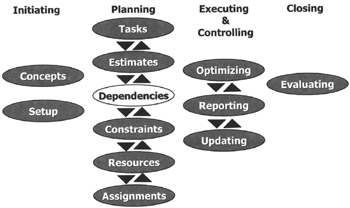
We have the tasks and the estimates entered into our project schedule and are ready to enter the dependencies, as the white highlight shows above. Dependencies are relationships between tasks.

After reading this chapter you will:

  • know what dependencies are and think of them in terms of cause and effect

  • realize how important dependencies are for dynamic schedules

  • be able to enter dependencies into an MS Project schedule

  • be able to choose the right type of dependencies

  • be able to determine if you need a lag or lead on a dependency, expressed in absolute or relative terms

  • be able to set multiple predecessors or successors on a task

  • know the best practices for the network logic in project schedules

  • be able to check if the network logic of a schedule follows the best practices

  • be able to format the Network Diagram view in an attractive way

The Beauty of Logic

Bob is working away at his desk when Nob enters his office: "What'ya up to, Bob?" he says.

Bob: "I am creating the schedule for this new project that I got last week. I am trying to figure out the dependencies between the tasks. It always takes me quite a bit of time to find all of them."

Nob: "Yes, as far as I am concerned it takes too much time. I don't bother with linking everything to everything anymore. It is too much work!"

Bob: "At this time in the planning of the project, I am tempted...

UNLIMITED FREE
ACCESS
TO THE WORLD'S BEST IDEAS

SUBMIT
Already a GlobalSpec user? Log in.

This is embarrasing...

An error occurred while processing the form. Please try again in a few minutes.

Customize Your GlobalSpec Experience

Category: Scheduling Software
Finish!
Privacy Policy

This is embarrasing...

An error occurred while processing the form. Please try again in a few minutes.