Dynamic Scheduling With Microsoft Office Project 2003: The Book by and for Professionals


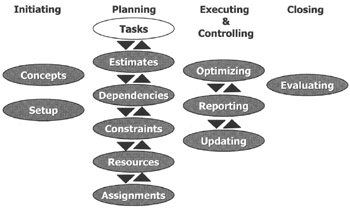
We have finished the Initiating phase and will now begin the Planning phase by entering Tasks (see the white balloon in the illustration). In fact, we will start with entering the deliverables. We recommend you enter the data in the order shown in this overview: first tasks, then estimates, dependencies, constraints, resources and finally, assignments.
After reading this chapter you will:
understand what a Work Breakdown Structure (WBS) is and its importance as the foundation of the project schedule
be able to create and change an indented WBS in MS Project
be able to create summary tasks, detail tasks, milestones, split task bars, recurring tasks and overhead tasks
be able to establish the right level of detail in the WBS
know how to edit, copy and move tasks
be able to check the WBS of the project schedule using scheduling best practices

Bob has Monica in his office; she is one of his team members. They are discussing the WBS that Monica forwarded to Bob. After chit-chatting, Bob opens the serious part of the meeting with "Overall your plan looks really good, but I would like to have a look at the way you formulated your deliverables. Can we do that?" Monica nods and unfolds her schedule in front of Bob. Bob runs his finger along the WBS, stops at one item and asks, "Here is the planning phase, and I don't see a deliverable in it. Isn't the deliverable here...