Dynamic Scheduling With Microsoft Office Project 2003: The Book by and for Professionals


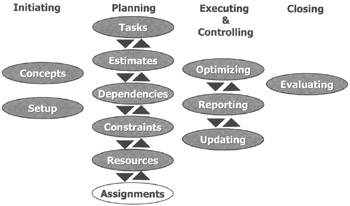
The assignments are the last type of data to enter into our project model (see the white highlight in the illustration above). After completing this chapter, we will have a complete model of our project.
After reading this chapter you will:
know what an assignment is as well as what part-time and full-time assignments are
know the difference between Fixed Duration, Fixed Units and Fixed Work tasks
be able to enter each type of task into MS Project
know how to assign resources using the Assign Resources dialog or the Task Form
be able to enter part-time, full-time, overtime and multiple assignments
know how to make changes to assignments and predict the resulting calculations by MS Project
be able to check if the assignments reflect the best practices of scheduling
know how to create a report of the assignments

Nob is making the rounds in his office. He greets Mary, the system analyst on his project, and gestures for her to sit down with him. "Have you started the system analysis on the web-enabling feature?" he asks.
Mary responds: "No, I haven't actually perhaps Richard has. Ask him."
Nob walks off to find Richard. He soon finds him: "Hey, Rich, did you start the systems analysis for my project?" Richard replies: "I was actually waiting for Lisa to call a short meeting so we can split up the responsibilities; did you ask her?"
Nob wobbles off to find Lisa. When he finds her,...