Harnessing AutoCAD 2007

Chapter 7: Dimensioning

INTRODUCTION

AutoCAD provides a full range of dimensioning commands and utilities. These enable the drafter to comply with the conventions of most disciplines, including architectural, civil, electrical, mechanical engineering, and many others.

After completing this chapter, you will be able to do the following:

  • Draw linear dimensioning

  • Draw aligned dimensioning

  • Draw angular dimensioning

  • Draw diameter and radius dimensioning for arcs and circles

  • Draw arc length dimensioning

  • Draw leaders with annotation and geometric tolerance

  • Draw ordinate dimensioning

  • Draw baseline and continue dimensioning

  • Use Quick dimensioning

  • Disassociate and reassociate dimensioning

  • Draw center marks for circles and arcs

  • Edit dimension text

  • Create and modify dimension styles

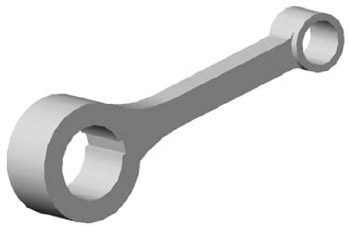
Figure 7-1 is a three-dimensional drawing of a lever arm. This "pictorial" rendering gives a viewer a good idea of what the object looks like, especially if the viewer has trouble understanding engineering drawings. Figure 7-2 is a typical engineering drawing of the same object. Because of the symmetry of the object, two views are sufficient. But in order to communicate the size and location information necessary to make the object, the drawing in Figure 7-3 has the vital data that the manufacturer needs. It's possible that other information, such as material and finish specifications, and tolerances could also be included. This section covers how to use AutoCAD to produce dimensions and notes for this type of drawing, as well as drawings for other disciplines such as architecture, civil engineering, and surveying.


Figure 7.1: Pictorial view of lever arm

Figure 7.2: Orthogonal views of lever arm

Figure...

UNLIMITED FREE
ACCESS
TO THE WORLD'S BEST IDEAS

SUBMIT
Already a GlobalSpec user? Log in.

This is embarrasing...

An error occurred while processing the form. Please try again in a few minutes.

Customize Your GlobalSpec Experience

Category: Computer-Aided Design (CAD) Services
Finish!
Privacy Policy

This is embarrasing...

An error occurred while processing the form. Please try again in a few minutes.