Harnessing AutoCAD 2007

Chapter 6: Fundamentals V

INTRODUCTION

After completing this chapter, you will be able to do the following:

  • Construct geometric figures by means of the MULTILINE (MLINE), SPLINE, WIPEOUT and REVCLOUD commands

  • Modify multilines and splines

  • Create or modify multiline styles

  • Use grips to modify objects, group objects, and filter certain types of objects by Quick Select for modification

  • Use inquiry commands

  • Change the settings of system variables

MULTILINES

The MLINE command allows you to draw multiple parallel line segments called multilines. You can modify the intersection of two or more multilines or cut gaps in them with the MLEDIT command. AutoCAD also allows you to create new multiline styles or edit existing styles composed of up to 16 lines, called elements, with the MLSTYLE command.

DRAWING MULTIPLE PARALLEL LINES

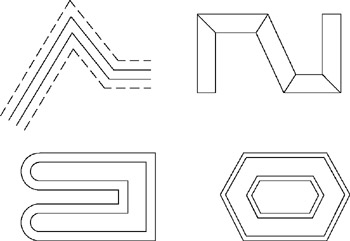
Multilines are multiple parallel line segments, similar to polyline segments that have been offset one or more times. Examples of multilines are shown in Figure 6-1.


Figure 6.1: Examples of multilines

The properties of each element of a multiline are determined by the current style when the multiline is drawn. The properties of multilines controlled by the style include whether to display the line at the joints (miters) and ends and, to close the ends, and rather to connect inner and/or outer elements. In addition, the style controls element properties such as color, linetype, and offset distance between two parallel lines.

Invoke the MLINE command by choosing Multiline from the Draw menu and AutoCAD prompts:

Specify start point or (specify a point or right...

UNLIMITED FREE
ACCESS
TO THE WORLD'S BEST IDEAS

SUBMIT
Already a GlobalSpec user? Log in.

This is embarrasing...

An error occurred while processing the form. Please try again in a few minutes.

Customize Your GlobalSpec Experience

Category: Nut Runners and Nut Drivers
Finish!
Privacy Policy

This is embarrasing...

An error occurred while processing the form. Please try again in a few minutes.