Harnessing AutoCAD 2007

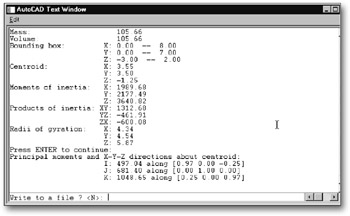
The MASS PROP command calculates and displays the mass properties of selected solids and regions. The mass properties displayed for solids are mass, volume, bounding box, centroid, moments of inertia, products of inertia, radii of gyration, and principal moments with corresponding principal directions. The mass properties are calculated based on the current UCS.
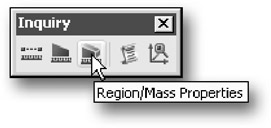
Invoke the REGION/MASS PROPERTIES command from the Inquiry toolbar (see Figure 15-126).
AutoCAD prompts:
Select objects: <i class="emphasis">(select the objects and press</i> ENTER <i class="emphasis">to complete the selection)</i>
The MASSPROP command displays the object mass properties of the selected objects in the text window, as shown in Figure 15-127. Then, AutoCAD prompts:
Write analysis to a file? <i class="emphasis">(type <b class="bold">y</b> to create a file or n tto not create a file)</i>
If you enter y, AutoCAD prompts for a file name and saves the file in ASCII format.
| Note | You can also use the AutoCAD LIST and AREA commands to obtain information about coordinates and areas ofsolid(s). |
The HIDE command hides objects (or displays them in different colors) that are behind other objects in the current viewport. Complex models are difficult to read in wireframe form, and become more clear when the model is displayed with hidden lines removed, HIDE considers circles, solids, traces, wide polyline segments, 3D faces, polygon meshes, and the extruded edges of objects with a thickness to...