Harnessing AutoCAD 2007

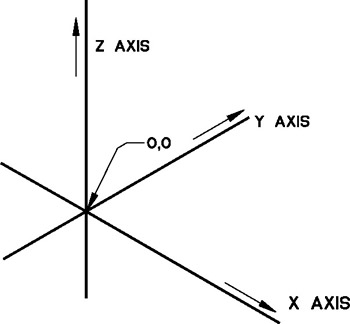
In two-dimensional drawings you have been working in a single plane with two axes, X and Y. In three-dimensional drawings you work with the Z axis, in addition to the Xand Yaxes (see Figure 15-1). Plan views, sections, and elevations represent only two dimensions. Isometric, perspective, and axonometric drawings, on the other hand, represent all three dimensions. For example, to create three views of a cube, the cube is drawn as a square with thickness and then viewed along each of the three axes. Drawing in this manner is referred to as extruded 2D. Only objects that are extrudable can be drawn by this method. Other views are achieved by rotating the viewpoint or the object, just as if you were physically holding the cube. You can get an isometric or perspective view by simply changing the viewpoint.
Whether you realize it or not, all the drawings you have done in previous chapters were created by AutoCAD in true 3D. What this means is that every line, circle, or arc that you have drawn, even if you think you have drawn it in 2D, is really stored with three coordinates. By default, AutoCAD stores the Z value as your current elevation with a thickness of zero. What you think of now as 2D is really only one of an infinite number of views...