Harnessing AutoCAD 2007

Chapter 9: Hatching, Gradients, and Boundaries

INTRODUCTION

After completing this chapter, you will be able to do the following:

  • Create hatch and gradient patterns using the HATCH command

  • Modify hatch patterns via the HATCHEDIT command

  • Control the visibility of hatch and gradient patterns

WHAT IS HATCHING!

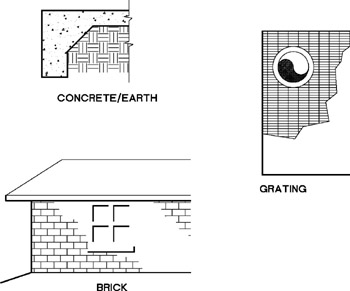
Drafters and designers use repeating patterns, called hatching, to fill regions in a drawing for various purposes (see Figure 9-1). In a cutaway (cross-sectional) view, hatch patterns help the viewer differentiate between components of an assembly and indicate the material of each. In surface views, hatch patterns depict material and add to the readability of the view. In general, hatch patterns greatly help the drafter/designer achieve his or her purpose, that is, communicating information. Because drawing hatch patterns is a repetitive task, it is an ideal application of computer-aided drafting.


Figure 9.1: Examples of hatch patterns

You can use patterns that are supplied in an AutoCAD support file called acad.pat, patterns in files available from third-party custom developers, or you can create your own custom hatch patterns. See Appendix E for the list of patterns supplied with acad.pat.

AutoCAD allows you to fill objects with a solid color in addition to a hatch pattern. AutoCAD creates an associative hatch, which updates when its boundaries are modified, or a non-associative hatch, which is independent of its boundaries. Before AutoCAD draws the hatch pattern, it allows you to preview the hatching and to adjust the definition if necessary.

Hatch patterns are considered as separate drawing objects. The hatch pattern behaves as...

UNLIMITED FREE
ACCESS
TO THE WORLD'S BEST IDEAS

SUBMIT
Already a GlobalSpec user? Log in.

This is embarrasing...

An error occurred while processing the form. Please try again in a few minutes.

Customize Your GlobalSpec Experience

Category: Inflatable Seals
Finish!
Privacy Policy

This is embarrasing...

An error occurred while processing the form. Please try again in a few minutes.