Mastering Autodesk VIZ 2005

Chapter 2: Introducing VIZ Objects

Overview

If you've never used a 3D modeling program, you may find the behavior of objects in VIZ to be rather unusual. Objects in VIZ are very dynamic and malleable, and they can be fairly complex. In this chapter, you'll get introduced to the ways you can create and form objects, and, in the process, you'll see that you can create just about any shape from just a handful of basic object types.

Most 3D modeling programs typically offer basic building blocks called primitives. Primitives are basic shapes on which you can build to form your model. VIZ offers three types of primitives that you can use to build forms: standard primitives, extended primitives, and splines. Let's start by looking at standard primitives. We'll get to splines in Chapter 3.

Understanding Standard Primitives

In Chapter 1, you used the Create tab of the Command Panel to create a box. Let's take another look at the Command Panel to see what else it has to offer.

  1. Start VIZ 2005.

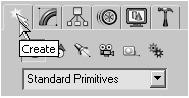
  2. Click the Create tab in the Command Panel.

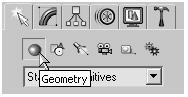
  3. Click the Geometry button just below the Create tab label.

    Note

    Note Notice that the list box just below the Create tools displays the Standard Primitives option. You can use other types of objects by selecting them from this list box. For now, you'll concentrate on the Standard Primitives.

You see the Object Type rollout that contains the standard primitives. You've already used the Box type...

UNLIMITED FREE
ACCESS
TO THE WORLD'S BEST IDEAS

SUBMIT
Already a GlobalSpec user? Log in.

This is embarrasing...

An error occurred while processing the form. Please try again in a few minutes.

Customize Your GlobalSpec Experience

Category: Mesh Generators
Finish!
Privacy Policy

This is embarrasing...

An error occurred while processing the form. Please try again in a few minutes.