Mastering Autodesk VIZ 2005

Map Scalar Modifiers

You have seen how you can map materials to objects by generating mapping coordinates (in the case of Primitives this is built-in), and by applying the UVW Mapping modifier. You have also seen how to fine-tune the tiling of a bitmap in the Coordinates rollout in the Material Editor. However, there is another way to approach the issue of mapping materials that is to use one of the Map Scalar modifiers.

Tip

In most cases, Map Scalars can be used to simplify the issue of mapping. Use the other options if you want greater control.

New !The Map Scalar Object Space modifier (OSM) is new in VIZ 2005. It provides a simplified way to map materials that will scale with the object. The older Map Scalar World-Space modifier (WSM) is still available for those occasions when you want the map size to be bound to absolute world scale.

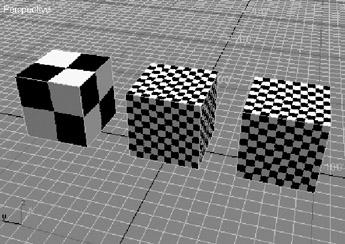
  1. On the CD Open the sample file Mapping.max (Figure 7.37) from the CD.


    Figure 7.37: Mapping sample cubes

    The sample file contains three 5' cubes that all share the same material. The applied material is using a Checkers diffuse color map that is set to tile once in each texture direction, U and V. The pattern that is mapped then consists of four squares, alternating white and black, that make a larger square as seen in Figure 7.38.


    Figure 7.38: The mapped pattern

  2. Select the first...

UNLIMITED FREE
ACCESS
TO THE WORLD'S BEST IDEAS

SUBMIT
Already a GlobalSpec user? Log in.

This is embarrasing...

An error occurred while processing the form. Please try again in a few minutes.

Customize Your GlobalSpec Experience

Category: Mapping and Surveying Services
Finish!
Privacy Policy

This is embarrasing...

An error occurred while processing the form. Please try again in a few minutes.