Mastering Autodesk VIZ 2005

Shaders are a set of methods VIZ uses to render materials. When you create a new material, one of the main things you need to determine is which shader to use. Walls are usually matte surfaces, so the wall material should use a shader that's best suited to such a surface. Baseboard trim might have a semigloss paint, in which case you'd best select a different shader to simulate the shiny surface.
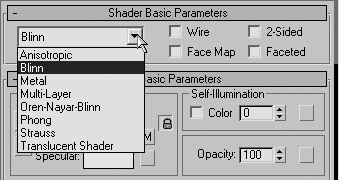
As you work with the Material Editor, you'll notice that you have a set of options under the Shader Basic Parameters rollout. You can think of shaders as different rendering methods applied to objects when they are rendered. Each shader provides a different way that the primary components of a material (the Ambient, Diffuse, and Specular colors, for example) are blended together. The primary shader options are found in the Shader Basic Parameters drop-down list. This list offers eight shaders: Anisotropic, Blinn, Metal, Multi-Layer, Oren-Nayar-Blinn, Phong, Strauss, and Translucent Shader.

Don't let these strange-sounding names scare you off. They are just different methods that VIZ uses to render Specular highlights and Diffuse and Ambient lighting on objects. You choose a shader depending on the type of material to which you are assigning the highlights or lighting. Here's a rundown of the shaders and their specialties:
Anisotropic Measures the difference of shininess from different angles and renders highlights accordingly. This shader is best used for very...