Mastering Autodesk VIZ 2005

Welcome to Mastering Autodesk VIZ 2005. Once again, Autodesk VIZ 2005 benefits from the development of its sister product, 3ds max, to give architects and other design professionals an indispensable design tool. VIZ 2005 gives designers cutting edge rendering technology, easier-to-use architectural materials, improved communication with other software, enhancements to modeling and animation tools, and improvements in the user interface.
This chapter introduces some of VIZ 2005's special features and then gets you started working with the VIZ 2005 interface.
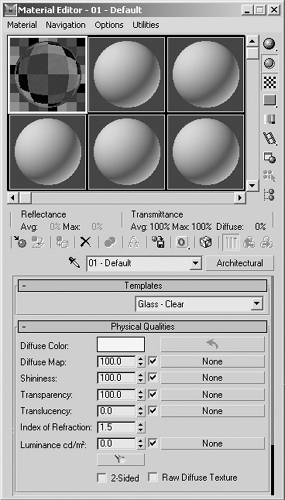
With the new Architectural material (Figure 1.1), it has become far easier to render realistic real-world materials in VIZ 2005. Featuring a preset list of commonly used building surfaces, this new material type will certainly save you time texturing your models.
| Note | Architectural is now the default material in VIZ 2005. |
If you're an AutoCAD or Architectural Desktop user, you'll find that importing and linking your building data into VIZ has been completely overhauled and greatly improved. A new Layer manager has been designed to work seamlessly with your existing AutoCAD and/or Architectural Desktop models and helps you to maintain the same project organization, materials, and layer standards.
VIZ 2005 now includes mental ray, which was formerly sold as a separate high-end rendering plug- in. mental ray is a film-quality rendering solution, fully integrated with VIZ 2005, that allows the most realistic rendering possible today,...