Mastering Autodesk VIZ 2005

To use the tutorials in this book, you'll want to be sure you've installed most of the components that are available on the VIZ installation CD. This means that you'll need at least 464 megabytes of free disk space for the VIZ files alone. You may also want to install the tutorials, samples, and partner files from the Partners CD. This will require another 360 megabytes of space. In addition, you'll want to install the sample files from the companion CD for this book, which will require another 500 megabytes of space. All together, you will need between 464 megabytes and 1.3 gigabytes of space on your hard drive, depending on the options you choose.
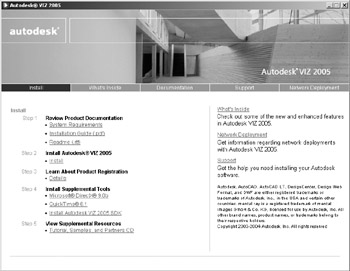
Installing VIZ is fairly straightforward. When you insert the VIZ disk into your CD-ROM drive, the Windows Autorun feature will automatically start the installation program on the VIZ CD. If Autorun is disabled, open Windows Explorer and double-click the startup application ( setup.exe) on the VIZ CD. You will be given the options for installing VIZ and a number of other related applications, including Microsoft DirectX, Apple QuickTime, and the Autodesk 2005 Software Development Kit (SDK) as shown in Figure A.1.
| Tip | Click the Network Deployment button in the Setup dialog box if you have purchased a network license. |
Click the Install button in Step 2 in the Install area of the Setup...