Mastering Autodesk VIZ 2005

In the previous three chapters, you spent time getting familiar with VIZ. In this chapter, you'll continue your exploration of VIZ's features, while exercising your newfound skills. You'll start by learning how to add openings to the walls you created in Chapter 3. Then you'll learn how you can import scanned images that you can use to trace over. In the process of tracing over a floor plan, you'll further explore methods for creating and editing forms using splines. You'll also be introduced to ways you can edit extruded shapes.
In the Chapter 3, you created a set of walls that completely enclosed a space. You'll need to add wall openings between the enclosed spaces of your model. To do this, you'll use Boolean operations to remove portions of a wall.
| Note | Note Boolean operations are named after George Boole, who developed a mathematical branch of symbolic logic. Boolean logic includes AND, OR, and NOT operators, which correspond to geometric union, intersection, and subtraction. |
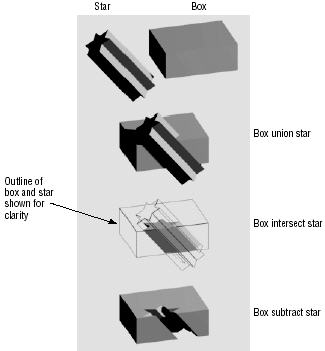
Boolean operations are methods you can use to join two objects together, subtract the shape of one object from another, or obtain a shape that is the intersection of two objects. Figure 4.1 illustrates the effect of Boolean operations on some sample shapes.
VIZ allows you to use two objects to form new shapes using Boolean operations. Those...