Accessing Autodesk Architectural Desktop 2007
Written for all levels, this book offers engaging, step-by-step tutorials and projects that clearly demonstrate and reinforce the real-world application of Autodesk Architectural Desktop (ADT) tools.
 TABLE OF CONTENTS
 Door/window assemblies and curtain walls allow you to create a unit with multiple window, door and panel components. The door/window assembly and curtain walls are created based upon a grid. The grid allows you to divide the horizontal and vertical dimensions of the unit into a number of equal divisions or manually specify grid locations.
After completing this chapter, you will be able to
Insert door/window assemblies using the DoorWinAssemblyAdd command and curtain walls using the CurtainWallAdd command.
Edit the properties of the door/window assembly and curtain wall.
Create and edit divisions, infills, frames and mullions.
Define fixed cell dimension, fixed number of cells and manual location of grid.
Assign door and window styles as infills.
Add or modify the profile used for frame and mullion components.
Apply interference to a door/window assembly to trim the AEC object.
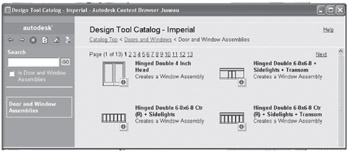
The style of a door/window assembly defines the content of the grid, which includes the divisions, frames, cell infills and mullions. There are over 100 door/window assembly styles included in the Door and Window Assemblies category of the Design Tool Catalog - Imperial [Design Tool Catalog - Metric] shown in Figure 6.1. Included are styles with arched, peaked and trapezoid shapes that can include transoms and skylights.
| Command prompt | DOORWINASSEMBLYADD |
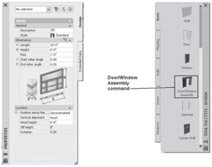
| Design palette | Select Door/Window Assembly from the Design palette shown in Figure 6.2. |