Accessing Autodesk Architectural Desktop 2007
Written for all levels, this book offers engaging, step-by-step tutorials and projects that clearly demonstrate and reinforce the real-world application of Autodesk Architectural Desktop (ADT) tools.
 TABLE OF CONTENTS
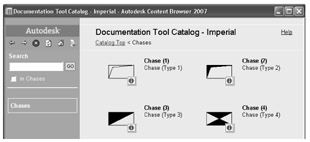
 The Chase symbol can be used to represent chimneys, ducts, or wall niches. Representations of chases can be placed in the drawing from the Chase category of the Documentation Tool Catalog - Imperial [Documentation Tool Catalog - Metric] shown in Figure 11.31.
| DesignCenter | Select the AEC Content tab of the DesignCenter and select Architectural Desktop\Imperial\Documentation\Chasesor Architectural Desktop\Metric\Documentation \Chases |
| Content Browser | Open the Documentation Tool Catalog - Imperial or Documentation Tool Catalog - Metric and choose the Chases category. |
When you drag the i-drop for a chase symbol from the Content Browser, you are prompted to specify the insertion point and the Add MV-Block with Interference dialog box opens. The interference of the chase with walls, spaces, slabs and roof slabs can be specified as additive, subtractive and ignore. The ignore interference condition is active only for walls. The size and description of the chase is specified in the Add MV-Block with Interference dialog box as shown in Figure 11.32. The size is specified by editing the scale values of the unit block in the Add MV-Block with Interference dialog box.
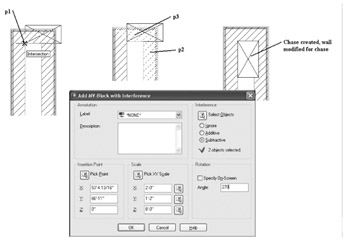
The options of the Add MV-Block with Interference dialog box are described in the following list:
Description A Description can be typed in this field to describe the chase.
INSERTION POINT:
Pick Point Select...