Accessing Autodesk Architectural Desktop 2007
Written for all levels, this book offers engaging, step-by-step tutorials and projects that clearly demonstrate and reinforce the real-world application of Autodesk Architectural Desktop (ADT) tools.
 TABLE OF CONTENTS
 The content of annotation is unique to a drawing; therefore it is usually placed on the View drawings in a project. The scale of View drawings is specified in the properties of the view when placed on a sheet. Prior to the placing of annotations in any project or non-project drawing, the annotation scale and display configuration must be set in the Drawing Window status bar.
The commands of the Annotation palette shown in Figure 11.1 represent a sample of the commands available in the Documentation Tool Catalog-Imperial and the Documentation Tool Catalog-Metric of the Content Browser. The commands within the Content Browser also reside in the Documentation folder in the DesignCenter. The scale specified in the annotation scale and display configuration of the Drawing Window status bar is applied to commands selected from the Annotation tool palette.
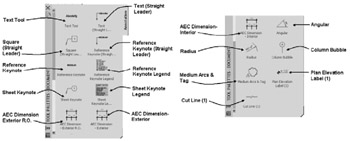
The Text Tool tool, accessed as shown in Table 11.1, inserts Mtext scaled similarly to dimensions and leaders. The text style, font, height and layer are preset by the command. Text is placed on the A-Anno-Note [A000T] layer. The text height is determined from the scale factor specified in Drawing Setup, which is multiplied by the annotation plot size of 3/32" [3.5]. Therefore, if you are placing text with the drawing scale set to 1/2" =1'-0" [1:25], the scale factor (24) [25] is multiplied by 3/32 [3.5] to obtain a text height...