Learning Mastercam X2 Mill 2D Step by Step
Chapter 10: Using Tabs and Work Offsets

10 1 Chapter Objectives

After completing this chapter you will be able to:

  1. Understand the uses of Mastercam X2 s tab function.

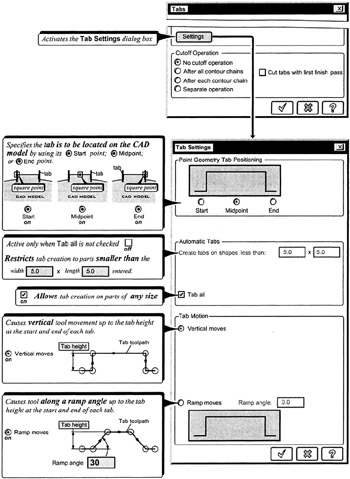
  2. Know how to specify tab parameters to create various types of tabs.

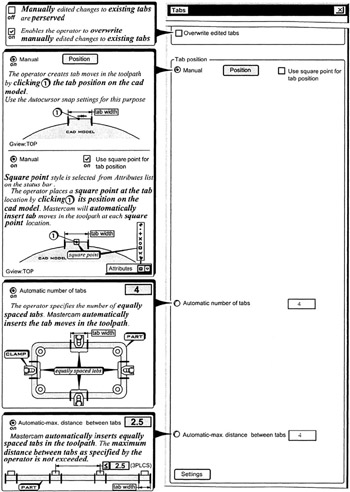
  3. Explain the methods of placing tabs on CAD models.

  4. Know how to edit tabs.

  5. Explain how to use the View Manager to create and set WCSs, Tplanes and their origins for work offsets.

  6. Know how to assign generic work offset numbers in the view manager.

  7. Understand how to select previously created work offsets using the View Manager.

10 2 Applications of Mastercam X2 s Tab Function

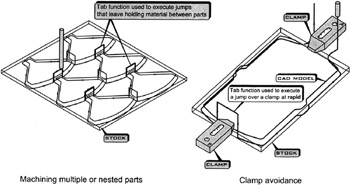
Mastercam X2 s Tab function is used to create undercut areas of a toolpath. These areas can be used to help hold down a nested pattern of parts that are to be cut from a single sheet of metal. Necessary jumps around clamps and other holding devices can also be created via the tab function.


Figure 10 1

10 3 Specifying Tab Parameters

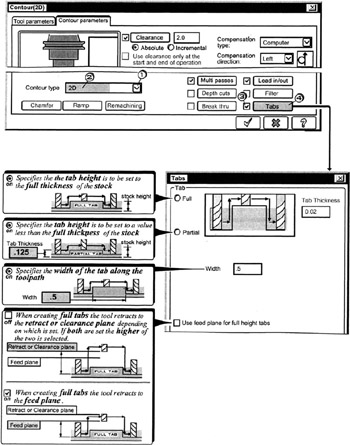
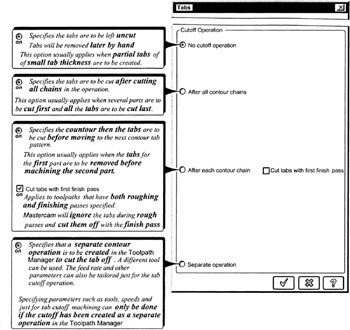
The Tabs dialog box contains the parameters for specifying various types of tabs. It is entered by clicking the Tabs button in the Contour 2D dialog box.

  • Click the down button

  • Click the contour type

  • Click the Tabs check on

  • Click the button

EXAMPLE 10 1

On the CD The pattern shown in Figure 10 2 is to be cut from a 4.5 4 .125 piece of brass. Assume the CAD model for the pattern has already...

UNLIMITED FREE
ACCESS
TO THE WORLD'S BEST IDEAS

SUBMIT
Already a GlobalSpec user? Log in.

This is embarrasing...

An error occurred while processing the form. Please try again in a few minutes.

Customize Your GlobalSpec Experience

Category: Battery Assembly Machines
Finish!
Privacy Policy

This is embarrasing...

An error occurred while processing the form. Please try again in a few minutes.