Learning Mastercam X2 Mill 2D Step by Step
2 9: Geometric Letter Constructions in 2D Space

2 9 Geometric Letter Constructions in 2D Space

Geometric letters are used for creating text to be engraved(machined) into stock material. Geometric letters are composed of separate line, arc, and NURBS spline entities that are connected end to end. This is different from regular or non-geometric text which is taken as a single entity and cannot be machined.

CREATING GEOMETRIC LETTERS

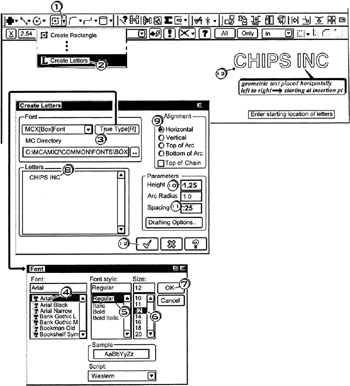
The Create Letters dialog box enables the operator to convert typed alphanumeric text into corresponding geometric alphanumeric characters. Mastercam X has pre-defined letter files for four fonts: Block, Box, Roman, and Slant. Mastercam X can create geometric letters from any True Type font listed in the Create Letters dialog box.

Geometric letters are created from True Type fonts. The operator clicks the desired font, font style, size, and alignment (Horizontal). Then enters the text height and spacing parameters. Finally, the operator clicks the starting location of the text.

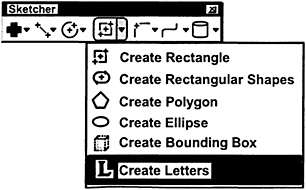
  • Click the down arrow

  • Click

  • Click the button

  • Click

  • Click

  • Click

  • Click

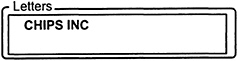
  • Click in Letters; enter the text

  • Click the Horizontal radio button on

  • Click in the Height box; enter the txt height

  • Click in the Spacing box; enter the spacing between letters

  • Click the OK button

    Enter starting location of letters

  • Click

  • Tap for function cancel

Geometric letters are created from True Type fonts. The operator clicks the desired

UNLIMITED FREE
ACCESS
TO THE WORLD'S BEST IDEAS

SUBMIT
Already a GlobalSpec user? Log in.

This is embarrasing...

An error occurred while processing the form. Please try again in a few minutes.

Customize Your GlobalSpec Experience

Category: Industrial Keypads
Finish!
Privacy Policy

This is embarrasing...

An error occurred while processing the form. Please try again in a few minutes.