Learning Mastercam X2 Mill 2D Step by Step
On the CD The various functions for constructing lines via Mastercam X2 are presented in this section.

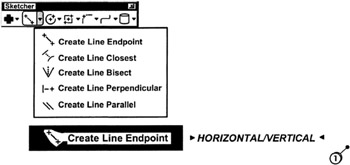
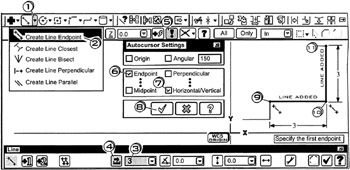
A horizontal or vertical line is created between inputted start and end points. The horizontal line can also be offset a specified distance from the x-axis Similarity the vertical line can be offset a specified distance from the y-axis.

Click
the line down arrow ![]()
Click
![]()
Specify the first endpoint
Click
in the line length box; enter ![]()
Click
on the length button
to Hard-lock the length field ![]()
Click
the Config button ![]()
Click
the checks on for
![]()
Click
the OK button ![]()
Click
near the start/end locations of the horizontal line
Click
near the start/end locations of the vertical line
Press
to cancel the function
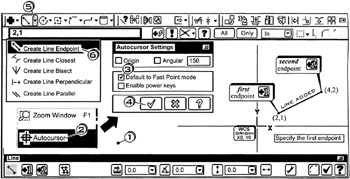
A line is created between inputted start and end points

Tap the
keys to zoom fit the display
Right Click
; Click
![]()
Click
the check on for ![]()
Click
the OK button ![]()
Click
the line down arrow ![]()
Click
![]()
Specify the first endpoint
Enter ![]()
Specify the second endpoint
Enter ![]()
Press
to cancel the function
| Notes |
|