Learning Mastercam X2 Mill 2D Step by Step
After completing this chapter you will be able to:
Execute commands for specifying drill points on a 2D wireframe CAD model.
Know how to use Mastercam s Machine Group Properties dialog box to setup stock and the Material Manager dialog box to specify stock material.
Explain how to select tools from Mastercam s tool library and assign tool speeds and feeds
Understand how to use the drill function to specify important drilling parameters at a drill point.
Explain how to check toolpaths via the backplotter.
Know how to use the verifier to view real time solid model animation of the entire machining process.
Explain how to pan and zoom and section the machined part within the machining verifier.
State how to machine a circle in stock using the circle mill module.
Understand the process of machining holes at different depths and retract heights.
Know how to edit existing drill tool paths.
Explain the steps taken in generating a word address part program to run on a CNC machine tool(postprocessing).
Know how to use Mastercam s Machine Definition Manager to select different machine tools and posts.
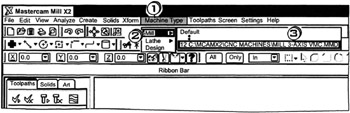
The Mastercam X2 Mill package must be active before any of the drill functions can be used.

Click
the
drop down menu
Click
the
package
Click
the
general vertical milling machine with a Fanuc type controller.