Learning Mastercam X2 Mill 2D Step by Step


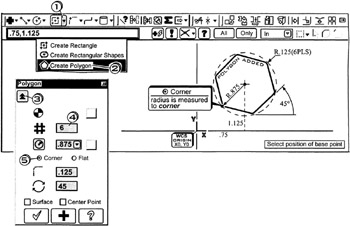
A polygon is created. The operator enters the Number of sides, Radius, Start angle(measured +ccw from the +x-axis). The operator also indicates the radius is measured from the center to the Corner of the polygon and inputs the polygon s center location.
.75, 1.125

Click
the down arrow ![]()
Click
![]()
Click
the Expand button ![]()
Click
in the Number of sides box
; enter ![]()
into the Radius bo x
; enter ![]()
Click
the Corner radio button ![]()
into the Fillet radius box
; enter ![]()
into the Rotation box
; enter ![]()
Select position of base point
Enter ![]()
Press
to cancel the function
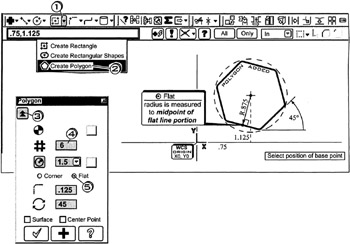
A polygon is created. The operator enters the Number of sides, Radius, Start angle(measured +ccw from the +x-axis). The operator also indicates the radius is measured from the center to the midpoint of the flat side of the polygon and clicks the polygon s center location.

Click
the down arrow ![]()
Click
![]()
Click
the Expand button ![]()
Click
in the Number of sides box
; enter ![]()
into the Radius box
; enter ![]()
Click
the Flat radio button ![]()
into the Fillet radius box
; enter ![]()
into the Rotation box
; enter ![]()
Select position of base point
Enter ![]()