Learning Mastercam X2 Mill 2D Step by Step
2 8: Ellipse Constructions in 2D Space

2 8 Ellipse Constructions in 2D Space

CREATING ELLIPSES

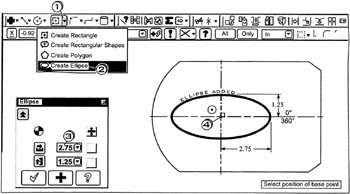
On the CD A full ellipse is created. The operator specifies the X Axis Radius, Y Axis Radius and the center point location. The Start angle is taken as 0 , the End angle as 360 .

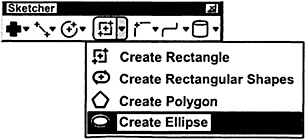
  • Click the down arrow

  • Click

  • Click in the Radius A box ; enter

  • into the Radius B box ; enter

    Be sure Autocursor is set to

    Select position of base point

  • Click near the center of the arc

  • Press to cancel the function

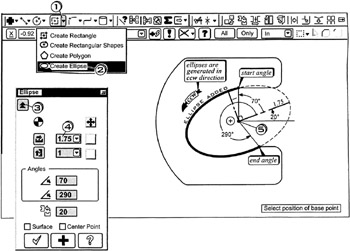
A portion of an ellipse is created. The operator specifies the X Axis Radius, Y Axis Radius and the center point location. The Start and End angles for the elliptical portion of the ellipse are inputted. Finally, the operator keys in the desired Rotation Angle of the element.

  • Click the down arrow

  • Click

  • Click the Expand button

  • Click in the Radius A box ; enter

  • into the Radius B box ; enter

  • into the Start angle box ; enter

  • into the End angle box ; enter

  • into the Rotation box ; enter

    Be sure Autocursor is set to

    Select position of base point

  • Click near the center of the arc

  • Press to cancel the function

UNLIMITED FREE
ACCESS
TO THE WORLD'S BEST IDEAS

SUBMIT
Already a GlobalSpec user? Log in.

This is embarrasing...

An error occurred while processing the form. Please try again in a few minutes.

Customize Your GlobalSpec Experience

Category: Milling Cutters
Finish!
Privacy Policy

This is embarrasing...

An error occurred while processing the form. Please try again in a few minutes.