Learning Mastercam X2 Mill 2D Step by Step
2 6: Rectangle Constructions in 2D Space

2 6 Rectangle Constructions in 2D Space

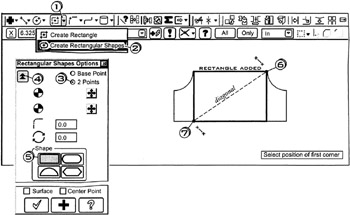
On the CD The create rectangular shapes function enables the operator to create rectangular shapes at any angle having 90 sharp corners or rounded corners. Other shapes that can be created with this function include Obround, Single D, Double D and Ellipse.

CREATING RECTANGULAR SHAPES

A rectangle is created. The operator specifies the Width, Height and Anchor position.

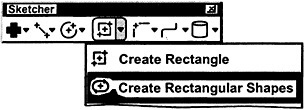
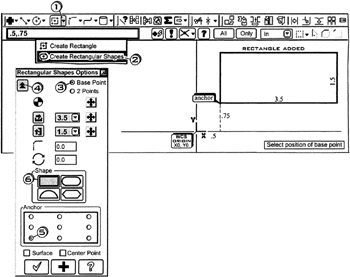
  • Click the down arrow

  • Click

  • Click the Base Point radio button

  • Click the Expand button

  • Click the lower left corner anchor

  • Click the rectangular shape button

    Select position of base point

  • Tap the to activate Fastpoint

  • Enter

    Enter width and height or select position of corner

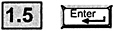
  • Tap the key for Width; enter

  • into the Height box; enter

  • Press to cancel the function

A rectangle is created whose size and location is determined by inputting its diagonal endpoints.

  • Click the down arrow

  • Click

  • Click the 2 Points radio button

  • Click the Expand button

    Select position of first corner

  • Click the rectangular shape button

    Be sure Autocursor is set to

  • Click near the end of the arc

    Select position of second corner

  • Click near the end of the line

  • Press to cancel the function

A rectangle is created whose size...

UNLIMITED FREE
ACCESS
TO THE WORLD'S BEST IDEAS

SUBMIT
Already a GlobalSpec user? Log in.

This is embarrasing...

An error occurred while processing the form. Please try again in a few minutes.

Customize Your GlobalSpec Experience

Category: Punching Services
Finish!
Privacy Policy

This is embarrasing...

An error occurred while processing the form. Please try again in a few minutes.