Learning Mastercam X2 Mill 2D Step by Step
After completing this chapter you will be able to:
Understand the uses of the different types of CAD models: wireframe, surface, and solid.
Know how to create solid features by extrusion.
Understand how to avoid extrusion errors.
Know how to create solid features by revolving.
Explain the methods of creating fillet and chamfer features on solid models.
Describe the methods of editing solid model features.
Know how to create solid models via Boolean functions.
Understand how to build a history tree for an imported brick solid.
Depending upon its geometric complexity, the type of machining to be executed and other production parameters, the actual part is defined as a simple wire frame model, a surface model or a solid model.
Wireframe Models
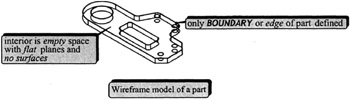
Simplest representation of a part as a collection of geometric elements: lines, arcs, points and splines.
Only the boundary or edges of the part can be defined
Only flat planes can be defined between the boundaries and the interior is void of points.
Requires the least ammount of database.
System does not create a history tree of all the elements that comprise the model.
Surface Models
More complete representation of a part as a collection of geometric elements: lines, arcs, points and splines and surfaces of zero thickness.
Only the boundary and surface within...