Learning Mastercam X2 Mill 2D Step by Step
After completing this chapter you will be able to:
Understand how to use the Solid Drill function to create drill toolpaths on a solid model.
Know how to create a 2D chained contour on a solid model using the Chaining dialog box: Solids mode.
Explain how to supress and unsupress solid features for machining and filing purposes.
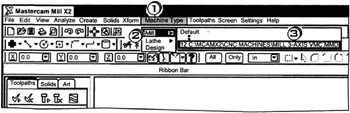
The Mastercam X2 Mill package must be active before any of the milling functions can be used.

Click
the
drop down menu
Click
the
package
Click
the
general vertical milling machine with a Fanuc type controller.
Mastercam X2 features the solid drill function to automatically execute the following operations:
search and list all hole sizes and Z-depths in a solid model.
create tool paths for drilling the holes.
select tools and drill depths and create the pilot drilling operation for the holes.
select tools and drill depths and create the peck drilling operation for the holes.
select tools and tap depts and create the tapping operation for the holes.
The cycle stored with each tool definition determines the drill cycle that is used in each operation.
The Solid Drilling dialog box can be activated from either the Toolpaths pull down menu bar or the 2D Toolpaths