Learning Mastercam X2 Mill 2D Step by Step
After completing this chapter you will be able to:
Understand the advantages of using Mastercam s operations library
Know how to save operations to the operations library
Explain how to import operations from the operations library.
State how to edit data in the operations library.
Mastercam s Operations Library is an important productivity booster. It enables the operator to catalog and store an operation or sequence of operations under a single group name. For example, the group name stored in the library TAP_1/4 20 could contain the center drilling, drilling and tapping operations required for producing the hole. Later, the operator can import the group TAP_1/4 20 from the library and apply it to any other subsequent part as needed. Producing holes that require center drilling, drilling, tapping, reaming, chamfering and circle milling, etc account for a majority of the machining in many shops. Creating a library of these repetative machining operations will cut down on needless duplication of effort.
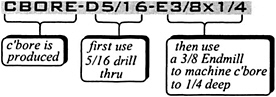
Create a convenient naming code for each group. Create the operations associated with that group. See Table 9 1. Save the groups to the operations library for use in other parts.
| Group Name | Operation(s) | Tooling |
|---|---|---|
| | CENTER DRILL .2 DEEP PECK DRILL THRU CIRCLE MILL .25 DEEP | 1/8 CTR DRILL 5/16 DRILL 3/8 ENDMILL |
| | ROUGH AND FINISH POCKET . 1 25 DEEP. LEAVE .01 FOR FINISH CUT IN XY... |