How to Cheat in 3ds Max 2009: Get Spectacular Results Fast

Mapping Coordinates

Mapping is a method of specifying the orientation and size of maps on an object. For mapping, 3ds Max uses a special coordinate system that works with both flat and curved sections of objects. When you apply a material to an object, the object s own mapping coordinates determine the textures orientation and size.

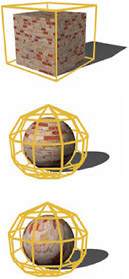
Every primitive, and just about every other kind of object you can create in 3ds Max, has mapping coordinates assigned to it by default. You can change the default coordinates by applying a UVW Map modifier to the object, where you ll have a selection of mapping types to choose from. In practice, you ll use just two or three of them for the majority of your work.

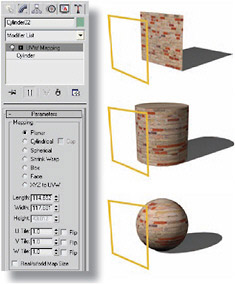
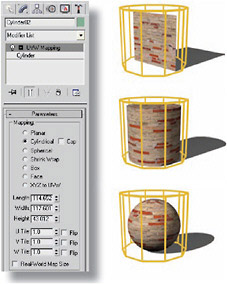
Figure 1: Every primitive in 3ds Max, and most other objects, have default mapping coordinates applied. As you d imagine, the default mapping coordinates correspond to the general shape of the primitive.

Figure 2: To change the mapping coordinates, apply a UVW Map modifier. The default setting for this modifier, Planar, projects the map onto the surface. This is the mapping type you ll use most often.

Figure 3: Cylindrical mapping looks good on curved surfaces, but warps at the edges of flat surfaces. This is the mapping type you ll use occasionally, mostly for round surfaces

Figure 4: Box, Spherical, and Shrink-Wrap have specialty uses for certain types of objects. You will rarely use these and other types available with the UVW Map modifier.

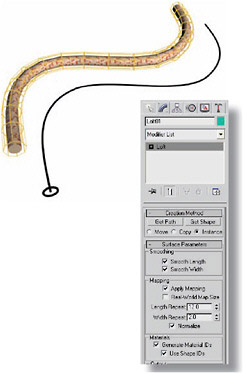
Figure 5: On a lofted object, you...

UNLIMITED FREE
ACCESS
TO THE WORLD'S BEST IDEAS

SUBMIT
Already a GlobalSpec user? Log in.

This is embarrasing...

An error occurred while processing the form. Please try again in a few minutes.

Customize Your GlobalSpec Experience

Category: Coordinate Measuring Machines (CMM)
Finish!
Privacy Policy

This is embarrasing...

An error occurred while processing the form. Please try again in a few minutes.