Exercise Workbook for Advanced AutoCAD 2007
After completing this lesson, you will be able to:
Create a Setup drawing.
Create Borders for 17 x 11, 24 x 18 and 36 x 24.
Lock a Viewport.
Create Page Setups for 17 x 11, 24 x 18 and 36 x 24.
The following instructions will guide you through creating a Master decimal setup drawing. This setup drawing is very similar to the setup drawing you may have made while using the Beginning workbook but create it anyway. In addition to giving you more practice, there are some minor differences in the settings, layers and styles.
Begin your drawing without a template as follows:
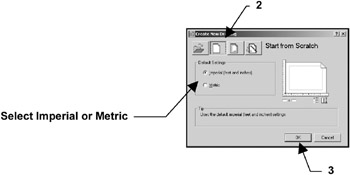
Select FILE / NEW .
Select START FROM SCRATCH Box.
Select " OK".
Your screen should be blank, no grids and the current layer is 0.

Set drawing specifications as follows:
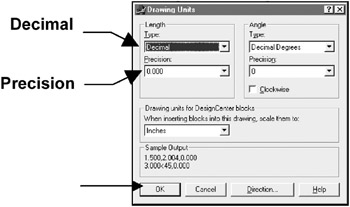
Select FORMAT / UNITS.
Change the Type and Precision , then select OK.

Select " FORMAT / DRAWING LIMITS.
Lower left corner = 0.000,0.000
Upper right corner = 17 , 11
Use "VIEW / ZOOM / ALL" to generate the new limits.
Set your Grids to ON to display the paper size.
Select " TOOLS / DRAFTING SETTINGS / SNAP and GRID tab.
Change the settings as shown below and then...