Exercise Workbook for Advanced AutoCAD 2007
The ATTRIBUTE command allows you to add text data to a block. You define the attribute and attach it to a block. Every time you insert the block, the attributes are also inserted.
For example, if you had a block in the shape of a tree, you could assign information (attributes) about this tree, such as name, size, cost, etc. Each time you insert the block, AutoCAD will pause and prompt you for What kind of tree is this? You respond by entering the tree name. Then another prompt will appear, What size is this tree? You respond by entering the size. Then another prompt will appear, What is the cost ? You respond by entering the cost. The tree symbol will then appear in the drawing with the name, size and cost displayed.
Another example could be a title block. If you assign attributes to the text in the title block, when you insert the title block it will pause and prompt you for What is the name of the drawing? or What is the drawing Number? . You respond by entering the information. The title block will then appear in the drawing with the information already filled in.
You will understand better after completing the following.
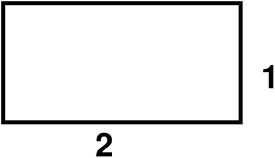
Draw a rectangle 2 X 1

Select the Define Attribute command using one of the following:
TYPE = ATTDEF
PULLDOWN = DRAW / BLOCK / DEFINE ATTRIBUTES
TOOLBAR = ATTRIBUTE