Exercise Workbook for Advanced AutoCAD 2007
Lesson 14

LEARNING OBJECTIVES

After completing this lesson, you will be able to:

  1. Construct 7 Solid model Primitives: Box, Sphere, Cylinder, Cone, Wedge, Torus and Pyramid

Sorry LT users, you do not have this option.

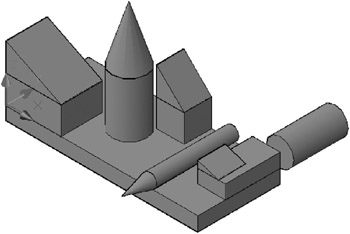
When you have completed this lesson you will be able to create the 3D Model shown below

DRAWING BASIC GEOMETRIC SHAPES

AutoCAD has 7 Solid shapes.

The 6 are, Box, Sphere, Cylinder, Cone, Wedge, Pyramid and Torus.

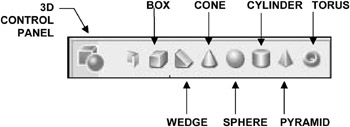
How to select a solid primitive.

  • TYPE = TYPE THE NAME

  • PULLDOWN = DRAW / MODELING

  • 3D MAKE CONTROL PANEL =

In this lesson you will learn the required steps to construct each of AutoCAD s basic geometric shapes. Each one requires different input information and some have multiple methods of construction.

3D input direction

When drawing in 3D and prompted for Length, Width or Height, each input corresponds to an axis direction as follows:

  • Length = X Axis

  • Width = Y Axis

  • Height = Z Axis

For example, if you are prompted for the Length the dimension that you enter will be drawn in the X axis. So keep your eye on the UCS icon in order to draw the objects in the correct orientation. Although it should be easy to visualize because you will actually see the shape constructed as you draw.

Consider starting the primitives on the Origin. It is useful to know where the primitive is located so it can be moved...

UNLIMITED FREE
ACCESS
TO THE WORLD'S BEST IDEAS

SUBMIT
Already a GlobalSpec user? Log in.

This is embarrasing...

An error occurred while processing the form. Please try again in a few minutes.

Customize Your GlobalSpec Experience

Category: Rotary Shafts
Finish!
Privacy Policy

This is embarrasing...

An error occurred while processing the form. Please try again in a few minutes.